INDUSTRY GUIDE
Barber appointment software for bookings, walk-ins and staff
Keep the appointments you take online and the work you accept at the door in the same calendar. Ordiva connects services, barber availability, customer records and business reporting.
Ordiva ·
Give each service its own time and price
Create separate services for a haircut, beard trim and combined appointment. Assign the barbers who can perform each one. Use the full time needed for the combined service instead of copying the shortest duration across the menu.
Check the assigned barber’s working hours and time off when availability looks wrong. An empty calendar does not necessarily mean a service has an eligible staff member.
Fit walk-ins around existing promises
Before accepting a walk-in, check how much time remains until that barber’s next booking. A 40-minute service cannot fit into a 25-minute gap just because the chair is empty now. Offer another available barber or time if needed.
Record the accepted job promptly. Keeping walk-ins in a separate verbal queue hides the capacity they consume from the online booking workflow.
Keep returning customers in one profile
Use the existing customer record to see previous appointments and relevant preferences. Update contact details on that record rather than opening another profile. A consistent record makes it easier to prepare for repeat visits.
Share the booking link on your own website or social profile so customers can choose a service, specialist and time. The link makes booking easier; it does not guarantee new customer traffic.
Review staff output with the right context
Compare completed appointments, revenue and tips for the same period. A barber handling longer services may complete fewer appointments without doing less work. Review the compensation model and relevant period before using performance figures for payroll.
Try your working day before choosing a plan
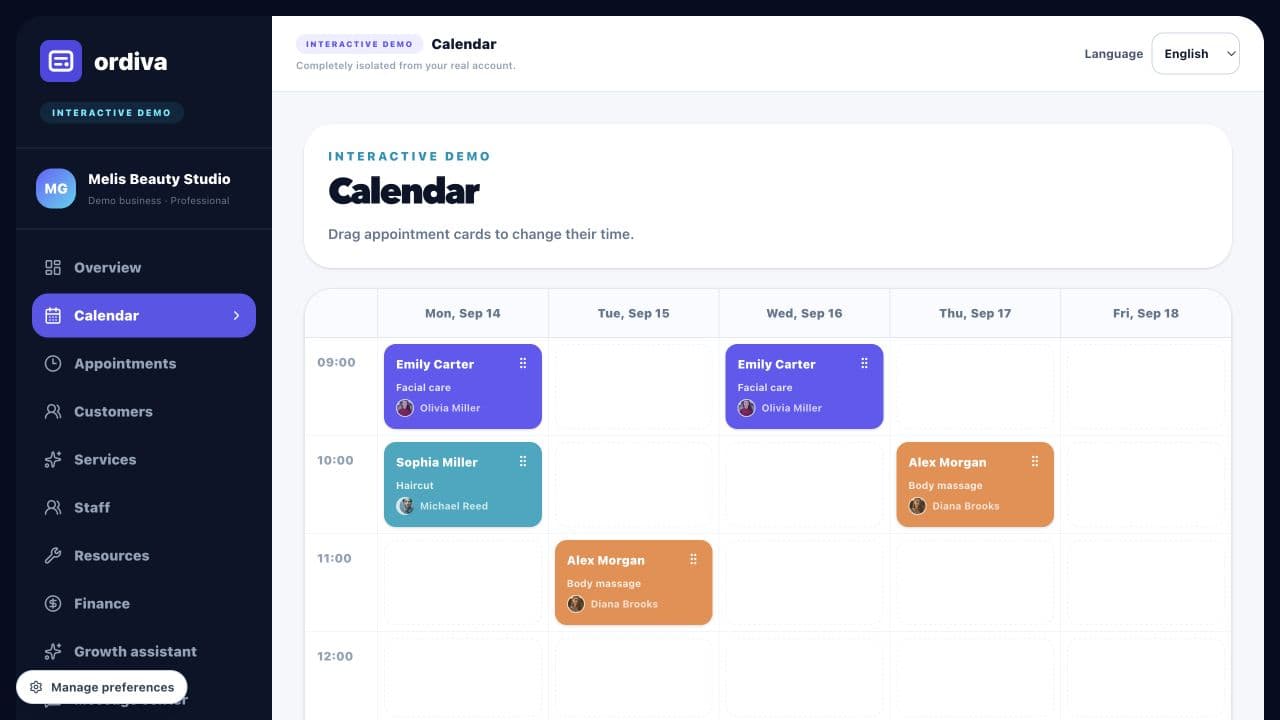
Open the barbershop demo to inspect sample services, staff, appointments and finance. Move a sample appointment in the calendar and run the simulated Growth assistant. The demo is isolated sample data; it does not create a real booking or send a message.
For a business trial, separately verify service creation, time off, walk-ins and payments with your own configuration. Account creation and plan selection happen in the Android app available on Google Play; the web panel uses the same account.
Booking software or a barber marketplace?
A booking link serves customers who already reach your shop through your website, social profile or referrals. A marketplace also aims to help people discover businesses. These are different needs: an appointment system should not be evaluated as a promise of new customers.
For Ordiva, evaluate how you manage bookings and share your business booking link. For customer acquisition, separately track where visitors come from and how many complete a booking. This keeps the value of an organised calendar separate from the cost of attracting a new customer.
Test a busy Saturday before switching your calendar
Use a short acceptance checklist when comparing barber appointment software. Start with sample customers and realistic service lengths, and check both the customer booking journey and the staff view. The following is a test plan, not a claim that every specialist workflow is automatic.
- ✓Create a haircut and a longer haircut-and-beard service, then check that each needs enough consecutive free time.
- ✓Add a walk-in while another barber has an online booking. Confirm the correct staff member and occupied time for both.
- ✓Move one appointment and cancel another. Check availability again before offering the released time to someone else.
- ✓Block a barber’s time off and check the booking link. Review the available services and staff before publishing it.
- ✓Complete a sample appointment and record payment. Compare appointments, collected revenue and expenses for the same date range.
Worked example: should you accept the next walk-in?
Suppose a barber is free at 10:00, the next confirmed appointment starts at 10:45, and a haircut takes 30 minutes with 10 minutes allowed for cleaning. The 40-minute job fits with five minutes to spare. A 60-minute haircut-and-beard service does not. These are illustrative timings, not a claim about your shop or an automatic scheduling rule.
Record the service, assigned barber and occupied time together. If you move the walk-in to another barber, check that person’s next appointment and skills too. Measure completed work separately from scheduled work so an unfulfilled booking does not look like a successful sale.
A three-minute tour of the barbershop demo
Select Barbershop in the demo. The English example uses USD with disclosed fixed demo exchange rates; it is not a live quote or a typical shop’s earnings.
- ✓Services: compare Haircut, Beard trim and Haircut and beard, including their different prices and durations.
- ✓Calendar: drag a sample appointment to a free cell. Try an occupied cell to see that the move is not accepted.
- ✓Finance: compare service price × completed count with total sample revenue, then inspect costs and sample profit. The historical monthly ledger is separate from the sample calendar.
- ✓Growth assistant: run the sample analysis, add an opportunity to the plan and open the linked calendar or customer view. No real AI request or customer message is sent.
Your first booking test after installing Ordiva
Install Ordiva from Google Play, create your business and add one barber with working hours. In Services, create Haircut and Haircut and beard as separate services, set your own durations and prices, and assign the barber. Then create a sample appointment and check its time and staff assignment in Calendar.
Before sharing your booking link, open it as a customer and check the same service and available time. Remove or cancel your test appointment afterwards. The public demo is a separate sample workspace; its records are not transferred to your business.
- ✓Service: duration, price and assigned barber are correct.
- ✓Staff: working hours and days off match the shop.
- ✓Calendar: a phone booking and an online booking use the same schedule.
- ✓Payment: completed work and the amount actually collected are checked separately.
Check the workflow before comparing subscription prices
Prepare one ordinary haircut, one longer combined service and one walk-in before a scheduled booking. Test each in your configured account. If you need an external payment terminal, marketplace listing or a specific messaging integration, confirm that requirement before subscribing; a booking calendar alone does not imply those integrations.